Adaptive Authentication
What is Adaptive Authentication:
Adaptive Authentication is a modern security approach that dynamically adjusts the authentication process based on the context and perceived risk of each login attempt or user action.
Unlike traditional Multi-Factor Authentication, which always requires a second verification step, Adaptive Authentication uses intelligent risk analysis to determine when extra verification is needed. It evaluates each sign in attempt and only prompts for additional verification if something seems unusual, such as signing in from a new device, browser, or location.
That means:
-
You won’t be asked for a One-Time PIN (OTP) every time you sign in.
-
The system checks for unusual activity (like signing in from a new device, location, etc.).
-
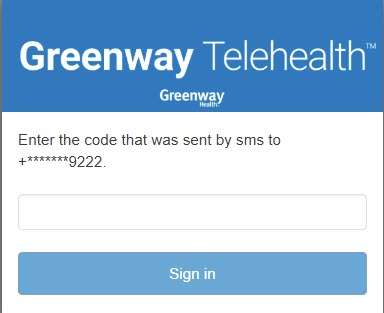
If something seems risky, you’ll be prompted to enter an OTP sent to your mobile phone number.
User Onboarding Process:
Existing Users
If you are an existing Telehealth user, you will be asked to enter your mobile phone number when you attempt to sign in. This is a one-time setup step, after completion of which you can continue using Telehealth. Once your mobile number is registered, a One-Time PIN (OTP) will be sent to that number for verification when needed
If your mobile number is already associated with your account, you will not be prompted to enter it.
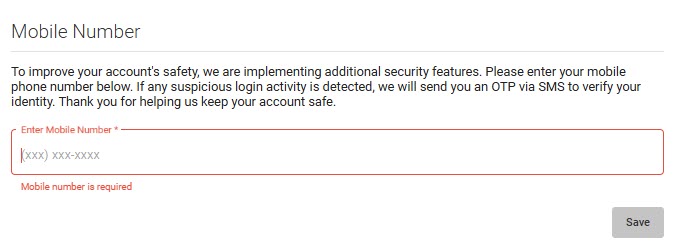
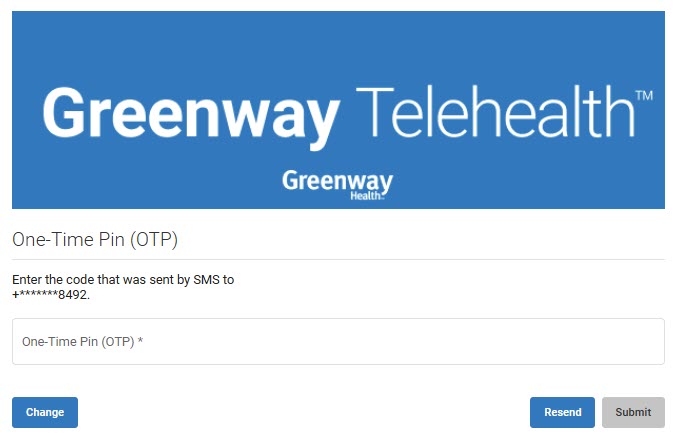
After entering the mobile number and clicking Save, you will receive an OTP on that number. Once the OTP is submitted successfully, the mobile number will be registered and Telehealth will be available to use.
On this screen, users can also update their mobile number or resend the OTP if needed.
New Users
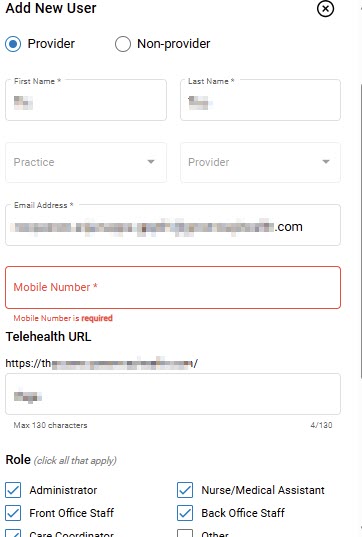
When adding new users, entering a valid 10-digit mobile number is mandatory during account setup. If you do not provide a valid mobile number, an error message will appear: “Please enter a valid 10-digit mobile number.”
How it works:
When you sign in to Telehealth, the system automatically evaluates the risk level of the login attempt using a combination of factors such as your device, browser, location, IP address, and authentication token.
-
Low Risk (Normal Login): If the sign-in matches your usual pattern — for example, using a familiar device, browser, and location — you will be granted access without needing an OTP.
-
Medium or High Risk (Unusual Login): If the sign-in attempt differs from your typical behavior — such as logging in from a new device, different browser, unfamiliar IP address, or a new geographic region — the system may classify it as suspicious and require OTP verification before granting access. The OTP is sent to the mobile number associated with your account, providing an additional layer of verification. If multiple incorrect passwords are entered (more than seven times), the system will display the message: “Password attempts exceeded.” The account will then be temporarily locked for security reasons.
This adaptive approach ensures that you are prompted for an OTP only when the system detects potentially risky behavior, maintaining a balance between strong security and a seamless user experience.